 BodVod
Coming soon to the App Store
A workout planner that explains every pick
BodVod plans each strength workout from what you log: an estimate of what has recovered, and what your week still needs. It helps you log every set, and it all stays on your iPhone.
- Free
- For iPhone
- No account
- Optional on-device AI
Today
DAILY QUEST
5lifts48 min
15 working sets · Push
Start workout Build my own insteadThe planTap a lift to see why it's here and how heavy
Bench press
3 × 8 @ 80 kg+2.5 kg
Load upIncline dumbbell press
3 × 10 @ 24 kg
Add a repSeated shoulder press
3 × 10 @ 20 kg
Repeat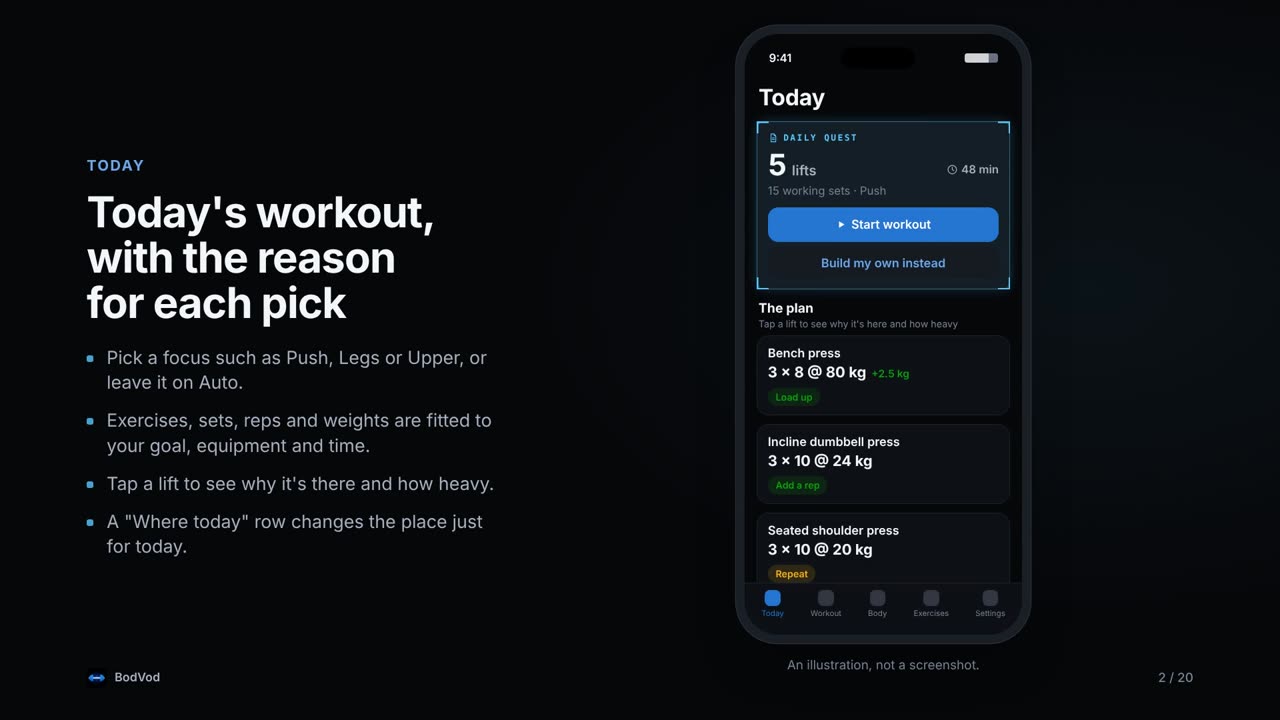
Today's workout, built from your own log
Open the app and the exercises, sets, reps and weights are ready, each with the reason it's there.
-
A plan for today
Pick a focus such as Push, Legs or Upper, or leave it on Auto. BodVod chooses exercises for your goal and equipment and fits them to the time you have.
-
An estimate of what has recovered
Every set adds fatigue to the muscles it works, and that fatigue fades over time. Tired muscles are steered away from, not banned.
-
A week that adds up
Each muscle gets a minimum number of sets a week, shared across the days you train. Whatever is still owed comes first.
-
How you feel counts
One optional question a day. Feel rough and you get fewer sets, each a rep further from failure. Mark a rest day and there's no plan at all.
-
Every number explained
Tap ⓘ beside any number to see what it is, how it's worked out from your log, and what you can do about it.
-
Plan your week
Set the days you usually train and change any single day on a calendar. Optional reminders ask "Training today?", suggest a meal two hours before, and give a heads-up 30 minutes before.
Logging that keeps up with you
Made for quick taps between sets, wherever you train.
-
Last time, right there
Each exercise shows what you did last time, like 80 kg × 8, 8, 7. Type the weight or reps, or nudge them with + and −.
-
Weights you can load
Log reps and reps in reserve. Reach the top of the rep range with reps to spare and the weight goes up next time, only ever to a weight your bar, plates or dumbbells can make.
-
Rest, supersets and warm-ups
The rest timer sits under the exercise you just did. Add or take off 30 seconds as you need, and get an alert even with the phone locked. Supersets take you straight to the partner exercise, and warm-up sets build up to heavy lifts.
-
Gym, home, park or beach
Choose a full gym, home gym, park, beach or bodyweight only, or list your own equipment. Training somewhere else today? Change it just for today. Missing some gear? Tap "Don't have the equipment?" on an exercise and BodVod swaps in the closest one your kit allows, for that workout only.
-
Form guides for 193 exercises
Written cues for every exercise, pictures for most, and a short demo video for some. Videos load from YouTube only when you tap play.
-
Kept if the app closes
A workout in progress is saved as you go. If iOS closes BodVod in the background, it opens where you left off, with the rest timer still running. After a break of more than six hours it asks whether you're still going, and you can save it as it was.
Your progress, worked out from your log
Records, charts and recovery all come from what you logged, so fixing a set fixes everything that came from it.
-
Progress charts
Estimated one-rep max on the lifts you do most, sets and workouts each week, and bodyweight, each with a table behind the chart.
-
Personal records
Four kinds of record, spotted the moment you finish a set.
-
Fix any workout
Correct a set, remove one that never happened, or log a past workout for the day you trained without your phone.
-
Share a workout
Share an image or a story video in four looks, made on the phone. The video's numbers count up, and neither shows your bodyweight.
-
A character that trains with you
Kai, Mira, Ember or Pebble grows a little stronger as you train and slowly eases back over a long break. How it changes
-
Apple Health, if you want it
Turn it on and BodVod reads sleep, heart rate variability, resting heart rate, workouts and steps to help with your daily check-in and recovery estimate. Steps also show on your character's card on Today, and count toward coins. Nothing is written back.
A character that grows as you train
A small character sits on Today and follows the workouts you log. Train on your planned days and it gets a little stronger. Take a long break and it slowly eases back.
Kai
Broadens through the shoulders.
Mira
Gets stronger and steadier.
Ember
A small flame that burns taller.
Pebble
A stone that grows crystals.
- E
- D
- C
- B
- A
- S
-
When you train
- Each workout on a planned day moves it up a little. A short workout counts in part.
- Each day it looks at your last four weeks and compares them with the days a week in your plan.
- Training on every planned day takes about four months to reach rank S. Training on half of them levels off around halfway.
- Hold rank S for months and three secret ranks, S+, S++ and S+++, are waiting beyond it.
-
When you take a break
- It eases off at about half the speed it grew, so a break costs less than it took to build.
- A week off barely shows, and a month off keeps most of it.
- Over a longer break it keeps easing down and can drop a rank or more. Train again and it grows back.
Four more to earn with coins
Coins come from logging workouts and, with Apple Health on, from walking. Once a character unlocks it stays unlocked.
Vanguard
A caped hero whose cape grows fuller.
300 coinsVolt
Picks up speed trails and sparks.
400 coinsRonin
A fighter whose aura flares up.
500 coinsShade
Shadows rise around it as it grows.
600 coins
After a workout your character flexes. Tap Share my character to send a picture of it, or Make it flex for a short looping GIF or video. All of it is made on your phone, and nothing leaves until you choose where to send it.
Today shows whether your character is growing, steady or easing off this week. It reflects your log, not your body: it can't see your muscles or your health. Pick a character or turn it off in Settings.
AI that stays on your iPhone
BodVod's suggestions are worked out on the phone, and each one comes with its reasoning.
PERSONALIZE THIS WORKOUT
Apple Intelligence picks between exercises
On iPhones with Apple Intelligence, tap Personalize this workout. Apple's on-device model can suggest up to three exercises from a shortlist the workout engine has already checked against your equipment and scored for your goal and recovery.
The engine sets the numbers
Sets, reps, weights, rest and time always come from BodVod's workout engine, which explains every pick. Without Apple Intelligence, the same engine plans every workout.
Nothing leaves the phone
The model runs on your iPhone. It gets your goal, experience, age range, today's check-in and note, and recent exercises, never your gender or bodyweight, and nothing is sent anywhere.
Other suggestions, all worked out on the phone
- A focus for today when your week calls for one, such as "Try Legs".
- A note that a lighter day may help when whole-body fatigue looks high.
- An answer for your daily check-in from your Apple Health readings, if you turn Health on.
- An offer to tune the recovery estimate to you, when how hard your sessions felt doesn't match it.
Your training stays on your phone
There's no account and no server, and the developer can't see your data. Read the privacy policy.
-
No account, no server
Nothing to sign up for. Workouts, profile and settings are stored on your iPhone, and nothing is sent to BodVod or anyone else.
-
Encrypted backups
Save an encrypted backup with a recovery key you write down, or export your history as a readable file you own.
-
Face ID or Touch ID lock
Optional. When it's on, BodVod asks when you open it and hides your log in the app switcher.
-
Online only for videos
The only time BodVod goes online for content is when you tap play on an exercise video, which comes from YouTube.
Nine looks to start, four to earn
Pick a theme in Settings. Only the colours change, so a number never means something different because the theme did. The last four unlock with the same coins as the characters.
-
Midnight
Calm near-black. The default.
-
Daylight
Bright and clean, for a sunny gym.
-
Match iPhone
Midnight or Daylight, following your iPhone's setting.
-
Awakened
Glowing quest windows on a deep night sky.
-
Warbound
Ash and iron with a dark crimson edge.
-
Golden Aura
Soft gold on deep indigo.
-
Dusk Runner
Warm orange at twilight, built for speed.
-
Neon District
Electric yellow and cyan on a rain-dark city.
-
Blossom
Soft petals and spring light.
-
Tidewater
Sea-glass teal on deep water. 60 coins.
-
Monolith
Black, white and silver. Nothing else. 100 coins.
-
Parchment
Warm paper and indigo ink. 150 coins.
-
Eclipse
A pink corona around a black sun. 200 coins.
Questions
When is BodVod coming out?
Soon, on the App Store for iPhone. This page will link to it once it's there.
How much does it cost?
BodVod will be free, with no subscription. There's an optional tip jar, and tips unlock nothing.
Do I need an account?
No. There's no account and no server, so there's nothing to sign up for and nothing to sync.
Which iPhones does it run on?
Any iPhone with iOS 17 or later. The on-device AI suggestions need an iPhone with Apple Intelligence turned on, on iOS 26 or later; without it, the workout engine plans everything as usual.
Can I train at home or outdoors?
Yes. Pick a home gym, park, beach or bodyweight only, or list your own equipment item by item, and change it for a single day when you train somewhere else.
Does it work with my watch?
If your watch or ring writes to Apple Health, BodVod can read sleep, heart rate variability, resting heart rate, workouts and steps from it once you turn Apple Health on. There's no Apple Watch app yet.
What happens to my character if I stop training?
It eases off at about half the speed it grew. A week off barely shows and a month off keeps most of it. Over a longer break it keeps easing down and can drop a rank or more. Train on your planned days again and it grows back.
How do I unlock characters and themes?
With coins. You earn one for each day you log a workout, one more when a workout beats a record, and two more for each full week on your plan. With Apple Health on, every 10,000 steps earns one more. Coins can't be bought.
What if iOS closes the app during a workout?
Your workout is saved as you go and opens where you left it. If you've been away for more than six hours, BodVod asks whether you're still going, and you can save it as it was.
Is BodVod medical advice?
No. BodVod gives estimates and suggestions from what you log. It isn't medical advice, and training carries a risk of injury, so use your judgement and speak to a professional if you have a health condition.
How do I get help?
Email mohdtalha@oddlybuilt.net or see the support page.
For iPhone
Coming soon to the App Store
BodVod will be free, with no account and no subscription.
Questions or ideas? Email mohdtalha@oddlybuilt.net.